Home and Small Business Networks — NetDaemons — Updated July 2026
The router your ISP installs when you sign up for Singtel Fibre, Unifi, or AIS Fibre is engineered to meet the contract minimum — not to cover your flat. If your 300 Mbps plan delivers strong speeds on a wired connection but drops off two rooms away, the ISP equipment is almost certainly the reason. This best WiFi router Singapore Malaysia 2026 guide covers four picks matched to the conditions that actually exist across the region: reinforced concrete residential construction, year-round tropical heat, densely packed apartments sharing hundreds of overlapping Wi-Fi networks, and ISP infrastructure ranging from Singapore’s gigabit-capable Singtel, StarHub, and M1 to Malaysia’s Unifi, Maxis, and TIME, Thailand’s AIS Fibre and True Online, and Vietnam’s Viettel, VNPT, and FPT Telecom.
At a Glance: Best WiFi Routers Singapore and Malaysia 2026
| Router | SGD Price | MYR Price | Wi-Fi Standard | Best For | NetDaemons Verdict |
| TP-Link Archer AX55 | SGD 110 | MYR 339 | Wi-Fi 6 AX3000 | Budget, ≤300 Mbps plans | ★★★★☆ Best Wi-Fi 6 entry without overspending |
| TP-Link Archer AX73 | SGD 162.90 | MYR 497* | Wi-Fi 6 AX5400 | 3–4 bed apartments, 15–25 devices | ★★★★☆ More headroom; SG primary — see note |
| ASUS RT-BE58U | SGD 169–199 | MYR 450 | Wi-Fi 7 BE3600 | WFH, 500 Mbps+ plans, VPN users | ★★★★★ Only Wi-Fi 7 pick in this guide; 2.5G WAN is the differentiator |
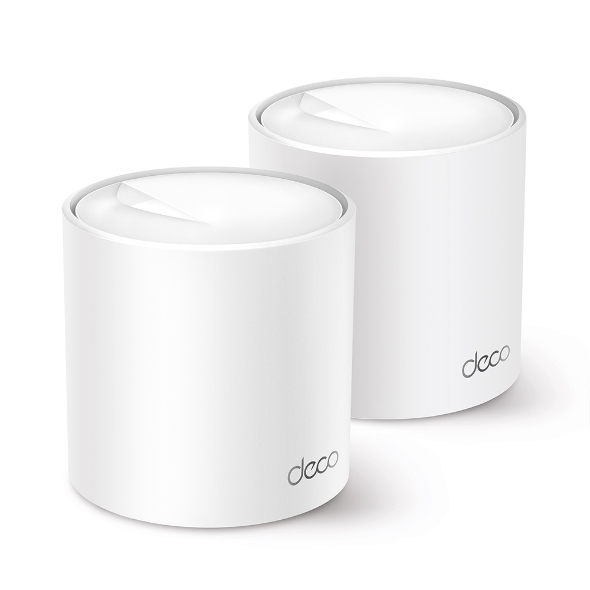
| TP-Link Deco XE75 PRO 2-pack | SGD 284 | MYR 1,306 | Wi-Fi 6E AX5400 | Multi-room condos, landed properties | ★★★★☆ Right answer when one router cannot cover the flat |
*MYR 497 Lazada MY listing at time of review showed no manufacturer warranty — see AX73 product section. SGD prices: Lazada SG / Courts / Harvey Norman. MYR prices: Lazada MY / Shopee MY. All prices indicative and subject to change.
| Disclaimer General: The NetDaemons team has researched and cross-checked pricing, availability, specifications, and product-positioning claims at time of review. Readers should independently verify current listings, warranty terms, and ISP compatibility before purchase. Pricing: All prices are indicative Lazada SG / Lazada MY / Shopee / Courts street prices at time of review and are not guaranteed selling prices. Discounts, promotions, and seller pricing vary frequently. Malaysian prices are for guidance only. Availability: Products may go out of stock or be replaced by updated variants. The TP-Link Archer AX73 Lazada MY listing at time of review showed no manufacturer warranty — Singapore-sourced listings with authorised TP-Link warranty are recommended for this model. Verdicts: Recommendations reflect the independent technical opinion of the NetDaemons team based on published specifications, verified listing data, buyer-signal review, and field experience. This article contains affiliate links — if you purchase through these links, NetDaemons may earn a commission at no extra cost to you. |
Stop — Answer These Questions Before You Buy
What speed do you actually get on a wired connection?
Plug a laptop directly into your ISP modem or ONT with an Ethernet cable and run a speed test. If wired speed is well below your subscribed plan, contact your ISP first. A new router will not fix a line-quality issue.
How many concrete walls separate your router from your farthest device?
Reinforced concrete — standard in Singapore HDB blocks, Kuala Lumpur condominiums, and Bangkok high-rise towers — absorbs 5 GHz Wi-Fi significantly. One or two walls is manageable with careful placement. Three or more, and a mesh system is likely the right purchase rather than a single router regardless of price.
Is your ISP modem in bridge mode or router mode?
Running a new router behind an ISP modem still in router mode creates double NAT — two devices doing IP address translation simultaneously. This causes dropped video calls, gaming connectivity issues, and failed port forwarding. Ask your ISP to enable bridge mode or IP passthrough before evaluating your new router’s performance.
Have you tried repositioning your current router first?
ISP technicians install the modem at the fibre entry point — usually near the main door or a utility cupboard — which is almost never the optimal location. Moving your existing router to an elevated, central position with 20 cm of clear air on all sides costs nothing and resolves coverage complaints more often than any hardware upgrade.
What Your Budget Actually Buys
Every router in this guide supports Wi-Fi 6 (802.11ax) or Wi-Fi 7 (802.11be). That matters in Southeast Asian cities because Wi-Fi 6’s OFDMA scheduling — a technology that lets the router serve multiple devices more efficiently at the same time — handles dense household device loads better than Wi-Fi 5. The RT-BE58U steps further to Wi-Fi 7, which adds Multi-Link Operation (MLO), allowing devices to connect across multiple bands simultaneously for lower latency and better consistency.
What this price range does not deliver across all picks: 2.5G wired WAN ports on budget models, tri-band radios on single routers, or 6 GHz Wi-Fi for client devices except on the XE75 PRO. The RT-BE58U is the exception on wired — it carries a 2.5G WAN port that prevents the wired bottleneck on Singapore’s increasingly common gigabit and multi-gigabit fibre plans.
The Four Routers Reviewed
TP-Link Archer AX55 — SGD 110 · MYR 339
Wi-Fi 6 AX3000 · Dual-band · 4 antennas · OneMesh compatible · Confirmed: Unifi Fiber, Maxis Fiber, Time Fibre compatible
| NetDaemons take: The lowest-cost entry into Wi-Fi 6 for households on plans up to 300 Mbps. Listing on Lazada MY confirms direct compatibility with Unifi Fiber, Maxis Fiber, and Time Fibre — the three main Malaysian fixed-line ISPs. |
What it does well
- AX3000 dual-band handles typical 3-bedroom household device loads without visible strain on plans up to 300 Mbps.
- OneMesh compatibility means you can add a TP-Link extender later rather than replacing the router entirely.
- Available on LazMall with local manufacturer warranty — the lowest-risk listing option on Lazada across all SEA markets.
Where it falls short
- No 2.5G WAN port — bottlenecks at 1 Gbps on gigabit fibre plans, which are standard on Singtel and TIME Malaysia.
- CPU shows strain with 25+ simultaneously active devices under heavy load, based on verified buyer feedback.
- No built-in VPN server for WFH users who need secure remote access to the home or office network.
| The most common reason a budget router underperforms in Southeast Asian apartments is placement, not hardware capability. Before attributing poor range to the router, move it to the highest, most central point in the flat with 20 cm of clear air on all sides — in our experience, that free step resolves more coverage complaints than any hardware upgrade at this price point. |
Who should skip it
Households on 500 Mbps+ plans, anyone who needs a built-in VPN, or homes regularly running 25+ active devices at peak time.
WFH verdict: Handles two to three simultaneous video calls without issue on a 200 Mbps+ plan. Not the right pick for households where four or more people are on calls at the same time.
Gaming verdict: Adequate for casual gaming. Latency is acceptable, not exceptional. A wired connection to the console or gaming PC remains the right choice for competitive play regardless of router.
Streaming verdict: Three concurrent 4K streams is the practical ceiling under full household load. HD streaming across five or six devices is comfortable.
| 👉 Available on Lazada Singapore · Shopee Singapore · Lazada Malaysia · Shopee Malaysia — search: TP-Link Archer AX55 |
TP-Link Archer AX73 — SGD 162.90 · MYR 497*
Wi-Fi 6 AX5400 · Dual-band · 6 antennas · OneMesh · HomeShield
⚠️ Malaysia warranty note: The Lazada MY listing at time of review showed “No Warranty” — a grey-market import listing. Malaysian buyers should source from a TP-Link authorised store on LazMall or verify warranty terms explicitly with the seller before purchase. Singapore Lazada/Courts listings carry standard TP-Link warranty.
⚠️ 2.5G port claim: One Lazada SG seller listing mentioned a 2.5G port. The official TP-Link Archer AX73 specification is Gigabit WAN only. Do not purchase expecting 2.5G wired performance — this appears to be a listing error.
| NetDaemons take: More radio headroom than the AX55 at a modest price premium. Confirmed compatible with Unifi Fiber, Maxis Fiber, and Time Fibre. The right single-router pick for larger 3–4 bedroom apartments with 15–25 active devices — provided warranty is confirmed for your market. |
What it does well
- AX5400 provides meaningfully more throughput headroom than AX3000 when device count climbs above 15 under simultaneous load.
- Six external antennas improve signal in rectangular floor plans — relevant in elongated Malaysian terrace houses and long-corridor HDB layouts.
- HomeShield basic tier covers parental controls and security scanning without a paid subscription.
Where it falls short
- Dual-band only — no dedicated backhaul channel if you later extend the network with a second unit.
- No built-in VPN server; WFH users who need remote access should use the RT-BE58U instead.
- Lazada MY warranty situation requires active verification before purchase — see note above.
| Six external antennas improve signal coverage only when the router is correctly positioned. An antenna-heavy router inside a cabinet or flush against a concrete wall will underperform a smaller router placed centrally in open air — in dense apartment buildings, placement and band selection determine real-world experience before antenna count does. |
Who should skip it
Households on plans below 200 Mbps — the AX55 gives comparable real-world results at lower cost. Also not the right pick for VPN users. Malaysian buyers must verify warranty status before ordering.
WFH verdict: Good stability under multi-device load. Lacks the VPN server of the RT-BE58U but handles mixed WFH and household traffic without issue in a typical 3-bedroom apartment.
Gaming verdict: AX5400 headroom keeps gaming latency more consistent when multiple streams run simultaneously — a meaningful improvement over AX3000 models in mixed-use evening conditions.
Streaming verdict: Handles four to five simultaneous 4K streams without visible degradation on a 300 Mbps+ plan.
| 👉 Available on Lazada Singapore · Shopee Singapore · Lazada Malaysia · Shopee Malaysia — search: TP-Link Archer AX73 |
ASUS RT-BE58U — SGD 169–199 · MYR 450
Wi-Fi 7 (802.11be) BE3600 · Dual-band · AiMesh · AiProtection · VPN · 2.5G WAN port · 3-year Local Manufacturer Warranty (MY verified)
| NetDaemons take: The only Wi-Fi 7 pick in this guide at mid-range pricing. The 2.5G WAN port removes the wired bottleneck on Singapore’s gigabit and multi-gigabit fibre plans. AiMesh and VPN server make it the most feature-complete router under SGD 200 in the SEA market. |
What it does well
- Wi-Fi 7 (BE3600) with Multi-Link Operation (MLO) handles dense multi-device loads with more consistency than Wi-Fi 6 dual-band peers — particularly relevant in congested HDB and condominium environments.
- 2.5G WAN port eliminates the wired ceiling on gigabit fibre plans from Singtel, StarHub, TIME Malaysia, and MyRepublic — the only sub-SGD 200 router in this guide with this capability.
- Built-in VPN server (OpenVPN), AiMesh expandability, AiProtection (Trend Micro), and 3-year local warranty on the Malaysia listing make this an unusually complete package at the price.
Where it falls short
- BE3600 is the entry-level Wi-Fi 7 class — dual-band only, no 6 GHz radio for client devices, which limits the full Wi-Fi 7 benefit to MLO and improved scheduling.
- Wi-Fi 7 client devices (phones, laptops supporting 802.11be) are still uncommon in the SEA market in 2026 — most households will not see the full benefit immediately.
- At SGD 199, it pushes against the value ceiling for a dual-band router — households that do not need VPN, AiMesh, or 2.5G wired will find the AX73 gives similar Wi-Fi performance at lower cost.
| The single configuration step that most improves WFH call stability on any router, including this one, is enabling bridge mode or IP passthrough on the ISP modem. Running this router behind an ISP gateway still in router mode creates double NAT — the leading cause of dropped video calls and failed port forwarding across the region. |
Who should skip it
Households on plans below 300 Mbps who do not need VPN or AiMesh — the AX55 delivers adequate Wi-Fi performance at considerably lower cost.
WFH verdict: The strongest WFH pick in this guide. VPN server, 2.5G wired, QoS, and stable Wi-Fi 7 performance make it noticeably better suited for remote work than any other option at this price point.
Gaming verdict: MLO reduces latency on Wi-Fi 7-capable devices. Adaptive QoS can prioritise gaming traffic over background downloads in mixed-use households. Wired to the router remains the lowest-latency option for competitive play.
Streaming verdict: Handles four to five simultaneous 4K streams without issue on a 300 Mbps+ plan. Wi-Fi 7’s improved scheduling keeps streaming consistent under full household load.
| 👉 Available on Lazada Singapore · Shopee Singapore · Lazada Malaysia · Shopee Malaysia — search: ASUS RT-BE58U |
TP-Link Deco XE75 PRO (2-pack) — SGD 284 · MYR 1,306
Wi-Fi 6E AX5400 · Tri-band · Dedicated 6 GHz backhaul · AI mesh · 100–240V confirmed · 313 reviews on Lazada MY LazMall
Single-node option: The XE75 1-pack is available on Lazada MY at approximately MYR 693–728 for households that want the mesh architecture in one room first, with the option to add a second node later. Verify SGD single-pack pricing on Lazada SG before purchase.
| NetDaemons take: The correct answer when one router genuinely cannot cover the flat. A dedicated 6 GHz backhaul channel keeps both 2.4 GHz and 5 GHz bands fully available for client devices — the main limitation of lower-cost two-band mesh systems. Coverage of approximately 370 sq m (4,000 sq ft) with two nodes. |
What it does well
- Dedicated 6 GHz band used exclusively as mesh backhaul means client devices are not competing with the backhaul link for bandwidth — the key performance advantage over two-band mesh systems at lower price points.
- Two-node coverage is appropriate for 3–4 bedroom condominiums and landed properties; 313 reviews with strong ratings on Lazada MY LazMall confirm real-world buyer satisfaction in the region.
- 100–240V universal input confirmed — compatible across all SEA power standards without an adapter, and maintains stable operation in markets with variable supply quality.
Where it falls short
- 6 GHz client device support (Wi-Fi 6E phones and laptops) remains uncommon in the SEA market — most households will not currently access the 6 GHz band for client connections.
- Node placement discipline is critical: the second node must be within one concrete wall of the first for the 6 GHz backhaul to sustain the throughput that justifies the XE75 PRO price premium.
- At SGD 284 / MYR 1,306, it is more than double the price of any single-router pick in this guide — only justified when coverage is the confirmed problem, not a placement or bridge-mode issue.
| The common mesh deployment mistake in concrete apartment buildings is placing both nodes too far apart. In HDB or high-rise construction, the second node should be within one room of the first — no more than one concrete wall between them — for the 6 GHz backhaul to maintain the throughput that justifies the XE75 PRO’s price over a simpler two-band mesh. |
Who should skip it
Smaller apartments where a well-placed single router covers the full space — the AX73 or RT-BE58U is significantly better value there. Also skip if your plan is below 300 Mbps or budget is the primary constraint.
WFH verdict: The best WFH pick in this guide for larger homes. Consistent signal across all rooms eliminates the dead-zone problem that undermines video call stability in extended apartment layouts and landed properties.
Gaming verdict: Strong for wireless gaming across multiple rooms. Wired Ethernet to the nearest Deco node is still preferred for competitive play — the XE75 PRO’s Gigabit LAN ports support this cleanly.
Streaming verdict: The best streaming pick in this guide for homes with three or more rooms. No buffering or signal degradation when multiple 4K streams run across different rooms simultaneously.
| 👉 Available on Lazada Singapore · Shopee Singapore · Lazada Malaysia · Shopee Malaysia — search: TP-Link Deco XE75 PRO |
SEA-Specific Considerations
Channel congestion is a real problem in SEA cities
Singapore HDB blocks, Kuala Lumpur condominiums, and Bangkok high-rise towers regularly have 80–150 overlapping Wi-Fi networks visible from any single apartment. The 2.4 GHz band has only three non-overlapping channels (1, 6, and 11) — and in dense residential buildings, all three are congested. Use 5 GHz for all performance-sensitive devices: laptops, phones on video calls, OTT streaming, and gaming consoles. Reserve 2.4 GHz for smart home and IoT devices that do not need high throughput. If your router supports automatic channel selection, enable it; if 2.4 GHz performance remains poor, manually test channels 1, 6, and 11 in sequence.
Heat and humidity management
Ambient temperatures of 28–35°C year-round, combined with humidity consistently above 70%, create a harsher operating environment for routers than most product specifications reflect. Never place a router inside a cabinet, behind a television, or on a shelf with less than 15 cm clearance on top and sides. Thermal throttling — where a router reduces performance to protect internal components — presents as intermittent slowdowns after several hours of uptime, not a complete hardware failure. If your router runs hot to the touch and performance degrades progressively through the evening, heat management is the cause before any hardware fault.
Power quality and surge protection
Singapore’s power supply is stable and voltage-related router failures are uncommon. Malaysia, Thailand, and Vietnam have more variable supply quality — particularly in older residential buildings and suburban areas. Return-power surges after outages are the most common cause of premature router failure across the region. A basic surge protector is a practical purchase alongside any router: Lazada MY listings show options from MYR 10–45; Thailand from THB 275–510; Vietnam from approximately VND 76,000–175,000. Verify current pricing and buy from a brand with local availability.
ISP modem placement and bridge mode
Singtel, StarHub, and M1 in Singapore; Unifi and TIME in Malaysia; AIS Fibre and True Online in Thailand all provide ISP-controlled gateway equipment. Technicians install this at the fibre entry point — usually near the main door — which is rarely the ideal central location for Wi-Fi coverage. Request bridge mode or IP passthrough from your ISP before or immediately after installation. Without it, running your own router behind the ISP modem creates double NAT, which degrades gaming performance and causes video call problems that appear to be router issues but are actually a network topology issue.
Warranty and regional service coverage
TP-Link and ASUS both operate established service centres across Singapore, Malaysia, Thailand, and Vietnam and are the lowest-risk brands to buy in this region from a post-purchase support perspective. Buy from LazMall or authorised reseller listings — these carry valid local warranties. Non-LazMall listings on Lazada and Shopee may be grey-market imports where warranty claims are not honoured locally. The AX73 Malaysia situation in this guide illustrates the risk: the most visible listing carries no warranty. Check before ordering, not after.
Vietnamese Dong and Thai Baht pricing note
This guide uses SGD and MYR as primary price references. Vietnamese and Thai buyers should verify on Lazada VN, Shopee TH, and local electronics retailers — prices and availability differ from the Singapore and Malaysia markets. TP-Link and ASUS products are widely available in both markets but price variance from SGD equivalents can be significant.
When to Spend More Than This Guide
Your home spans more than 185 sq m (approximately 2,000 sq ft), has more than one floor, or has four or more concrete walls between your router and the farthest device. No single router in this guide reliably covers this layout. Budget for a proper tri-band mesh system — the XE75 PRO 2-pack is the right answer, or look at ASUS ZenWiFi AX (XT8) class options above this guide’s price range.
Your fibre plan is 500 Mbps or above and you use wired workstations, NAS, or multi-gigabit switches. The RT-BE58U handles this with its 2.5G WAN port. For multi-gigabit plans above 1 Gbps, look at routers with 2.5G on both WAN and LAN ports — the TP-Link Archer AX72 Pro class or above.
You run a home business with multiple simultaneous WFH users, a VPN gateway, and remote desktop access. Consumer routers handle this adequately but not optimally at sustained load. A small business-grade access point paired with a dedicated edge router becomes worth evaluating at that level of demand.
Team NetDaemons Verdict
The following reflects the independent assessment of the NetDaemons team. Verify current pricing on Lazada, Shopee, Courts, and Harvey Norman before purchase. Malaysian buyers should confirm warranty status on the AX73 before ordering.
- TP-Link Archer AX55 (SGD 110 / MYR 339) — Best entry-level Wi-Fi 6 pick for plans up to 300 Mbps and households under 20 active devices. Confirmed ISP-compatible across Unifi, Maxis, and Time in Malaysia.
- TP-Link Archer AX73 (SGD 162.90 / MYR 497*) — Best single-router all-rounder for 3–4 bedroom apartments with 15–25 devices. Source from Singapore-authorised listings until Malaysia warranty situation is resolved.
- ASUS RT-BE58U (SGD 169–199 / MYR 450) — Best mid-range pick for WFH households, gigabit plan users, and anyone who will actively use VPN, AiMesh, or 2.5G wired. The only Wi-Fi 7 pick in this guide.
- TP-Link Deco XE75 PRO 2-pack (SGD 284 / MYR 1,306) — Best pick when coverage is the confirmed problem. The right answer for multi-room and multi-floor homes where a single router cannot deliver consistent signal.
| Before buying anything: run a wired speed test, confirm bridge mode is enabled on your ISP modem, and move your current router to the most central elevated location available. Those three steps cost nothing and frequently change the buying decision entirely. |
Have a specific ISP, apartment layout, or device setup you want advice on? Drop it in the comments — we read and respond to every one.
Related Articles
| Article | Why Relevant | Status |
| Best Home Wi-Fi Routers India Under ₹10,000 (2026) | India equivalent guide for comparison | ✅ LIVE |
| Best Wi-Fi Routers India Under ₹5,000 (2026) | Entry-level comparison for budget readers | ✅ LIVE |
| How to Set Up QoS on Your Home Router | Optimise WFH and streaming priority | ✅ LIVE |
| How to Fix Wi-Fi Dead Zones in SEA Apartments | Diagnosis before hardware upgrade | ⏳ Coming August 2026 |
netdaemons.com · Home and Small Business Networks · July 2026 · All prices indicative and subject to change. Verify before purchase on local platforms. See full disclaimer above.